 Rafael Baptista
From FreeNAS to TrueNAS SCALE
My first real NAS ran FreeNAS on a Dell PowerEdge. FreeNAS has since been renamed TrueNAS, and the version that matters today is TrueNAS SCALE: the same ZFS storage, but on a Linux base, with proper virtual machines (KVM), apps and far better hardware support. When the Supermicro server arrived, it was the moment for a fresh start on SCALE.
What I kept and what I rebuilt
- The data: kept, all of it. ZFS pools move between systems, so the existing pool was imported in TrueNAS SCALE with its datasets and snapshots intact.
- The virtual machines: mostly rebuilt from scratch. The old VMs were from a different hypervisor and a different era, so I created them again cleanly on SCALE - Nextcloud, Home Assistant, the game servers, the VPN and the rest. A good excuse to tidy up.
Everyone their own files
The NAS is used by the whole family, so it is set up like a small office:
- Everyone has their own account and their own credentials.
- Everyone has their own private space - nobody can see files they should not.
- Shared folders where it makes sense - for example the movies, which everyone can watch but nobody can accidentally delete: the share is read-only for normal users.
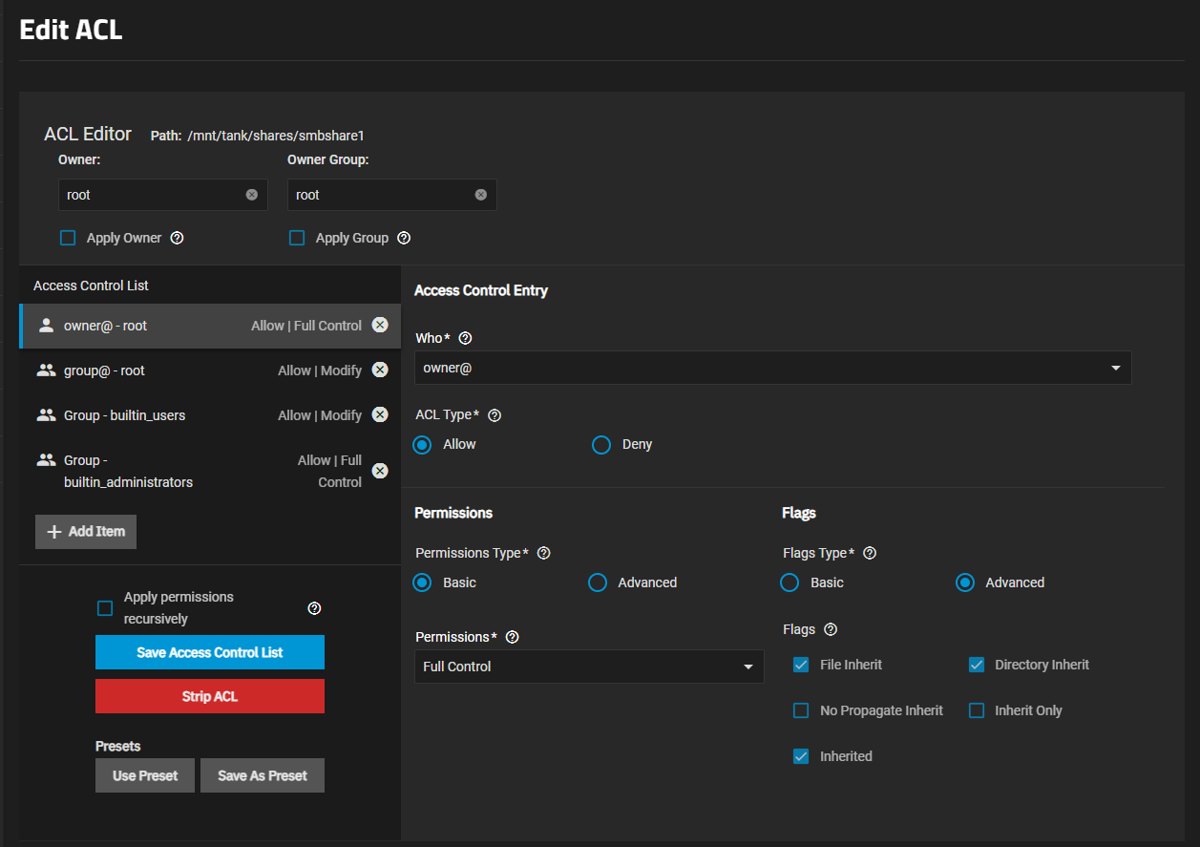
Guide: users, private folders and a read-only share
1. Import the existing pool
Storage > Import Pool, pick the pool, done. Datasets, snapshots and permissions come with it.
2. Create users and a group
Credentials > Local Users: one account per person, each with their own password. Put the family accounts in a group (for example family) so shared permissions are set once for everyone.
3. A private dataset per person
Create a dataset per person (for example tank/home/<name>), share it over SMB, and in the ACL give only that user (and the admins) access. Nobody else even sees the contents.
4. The read-only movies share
Create a movies dataset and SMB share, then edit its ACL:
familygroup: Read - watch and copy, but not change or delete.- Admin account: Modify or Full Control - the only one who adds or removes movies.
- Tick Apply permissions recursively so existing files get the same rules.
This share is also what Kodi on the TV reads the movies from.
5. Snapshots
Data Protection > Periodic Snapshot Tasks on every dataset. Even if someone deletes a file in their own folder, it can be brought back from a snapshot - and on Windows the snapshots even show up as "Previous Versions".
The result
One server with all the family's files, where everybody has their own space, the shared things are shared safely, and the same machine runs every VM in the home lab.