 Rafael Baptista
What Odysseus is
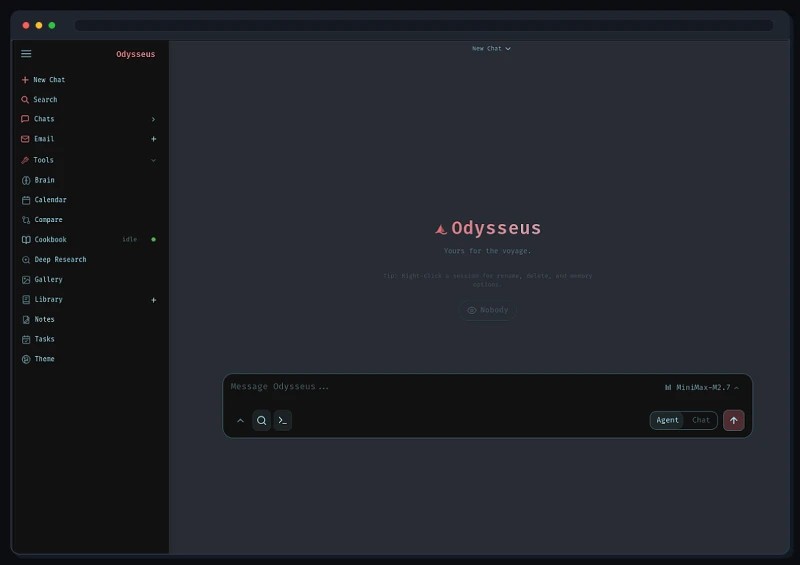
Odysseus is the self-hosted AI workspace started by Felix Kjellberg - better known as PewDiePie - and released as open source (AGPL-3.0). Instead of pasting my work into someone else's chatbot, it runs on my own server and can use local models: chat and agents, a document editor with AI edits, multi-step web research, long-term memory, notes, tasks and reminders - all in one web interface.
I run it in its own VM on my Supermicro server, and I did not leave it stock for long: below is the standard install, followed by what I changed.
The building blocks
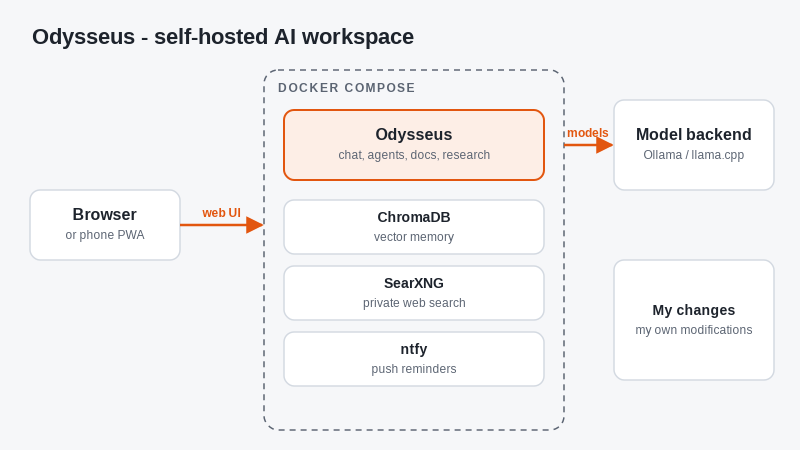
- Odysseus - the web app: chat, agents with approval gates for shell and file tools, documents, deep research, compare models side by side.
- ChromaDB - vector database for its memory.
- SearXNG - private meta search engine used by the research feature.
- ntfy - push notifications for reminders and scheduled tasks.
- A model backend - Ollama, llama.cpp, vLLM or an OpenAI-compatible API.
Guide: running Odysseus with Docker Compose
1. Requirements
Git and Docker Engine with Compose v2. At least 8 GB RAM (16 GB+ when running local models) and about 20 GB of disk to start, plus room for the models. A GPU is optional but makes local models usable.
2. Get the code and start it
git clone --branch main https://github.com/odysseus-dev/odysseus.git
cd odysseus
cp .env.example .env
docker compose up -d --build
Without --branch main you get the dev branch, which is newer but can be unstable.
3. First login
docker compose ps                                        # wait until healthy
docker compose port odysseus 7000                        # shows the web port on the host
docker compose logs odysseus | grep -i "temporary password"
Log in as admin with that temporary password and change it. You can also set ODYSSEUS_ADMIN_PASSWORD in .env before the first start.
4. Connect a model
For Ollama on the same host, Ollama has to listen on all interfaces (OLLAMA_HOST=0.0.0.0:11434, trusted LAN only) and Odysseus uses the endpoint http://host.docker.internal:11434/v1. Check it from inside the container:
docker compose exec odysseus curl http://host.docker.internal:11434/v1/models5. Keep it private
Everything binds to 127.0.0.1 by default. I reach it on the LAN and through the StrongSwan VPN, never directly from the internet - an AI agent with shell tools is the last thing to expose.
My modifications
A custom LLM instead of the built-in configuration
Out of the box Odysseus picks its models from its own built-in configuration. I wanted full control over which model answers, how it is served and with which settings, so I replaced that with my own custom LLM setup: Odysseus talks to my model server through an OpenAI-compatible endpoint, the same way it talks to Ollama in the guide above. That lets me swap or tune the model without touching Odysseus itself.
The Craft menu: creative apps inside Odysseus
I added a Craft menu to the sidebar that opens the Craft apps from ArtCraft. ArtCraft is a family of free, open-source creative programs written in Rust - an image editor (PhotoCraft), a PDF workbench (PdfCraft), vector illustration (VectorCraft), 2D animation (AniCraft), interface design (FigCraft) and more - and many of them also run straight in the browser.
Odysseus is good at writing, research and reasoning, but it has no proper tools to edit an image or a PDF. With the Craft menu, those tools sit next to the AI in the same interface: ask Odysseus to draft something, then open PhotoCraft or PdfCraft from the same sidebar to finish it, without leaving the page or installing anything on the device I happen to be using.
Most Craft apps are still early alpha or in development, so the menu grows as they mature.
How I keep my changes
Because Odysseus has no tagged releases - a version is simply a branch and a commit - I keep my changes on my own branch and bring upstream updates in with git pull / git merge, then rebuild with docker compose up -d --build. If an update breaks something, going back is one git checkout away.