 Rafael Baptista
Why an offline knowledge server?
Almost everything I look up lives on someone else's server. If the internet goes down for a day - or for a lot longer - Wikipedia, maps and how-to guides go with it. Project N.O.M.A.D. by Crosstalk Solutions is a free, open-source answer to that: an offline-first knowledge and education server that keeps Wikipedia, books, courses, maps and an optional local AI assistant on hardware you own. Just in case.
I set it up in two days as a virtual machine on my Supermicro server, which already has the storage and the RAM for it.
What is inside
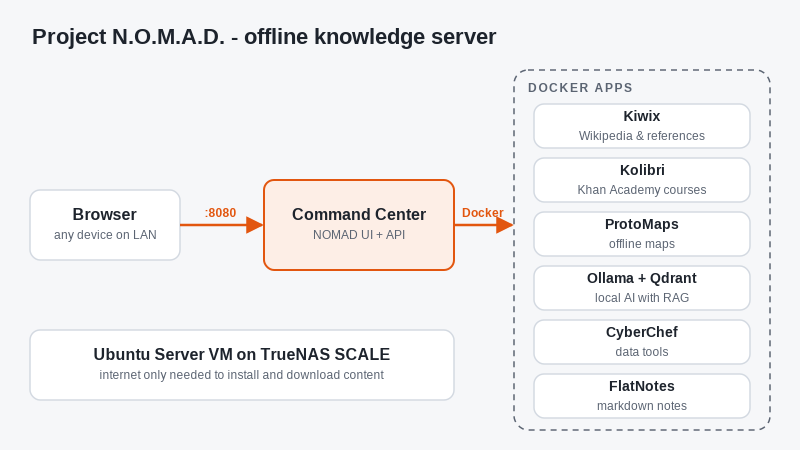
- Kiwix - offline Wikipedia, medical references, survival guides and e-books.
- Kolibri - Khan Academy courses with progress tracking.
- ProtoMaps - downloadable offline maps of the regions you choose.
- Ollama + Qdrant - an optional local AI assistant that can also search your own documents.
- CyberChef and FlatNotes - data tools and local markdown notes.
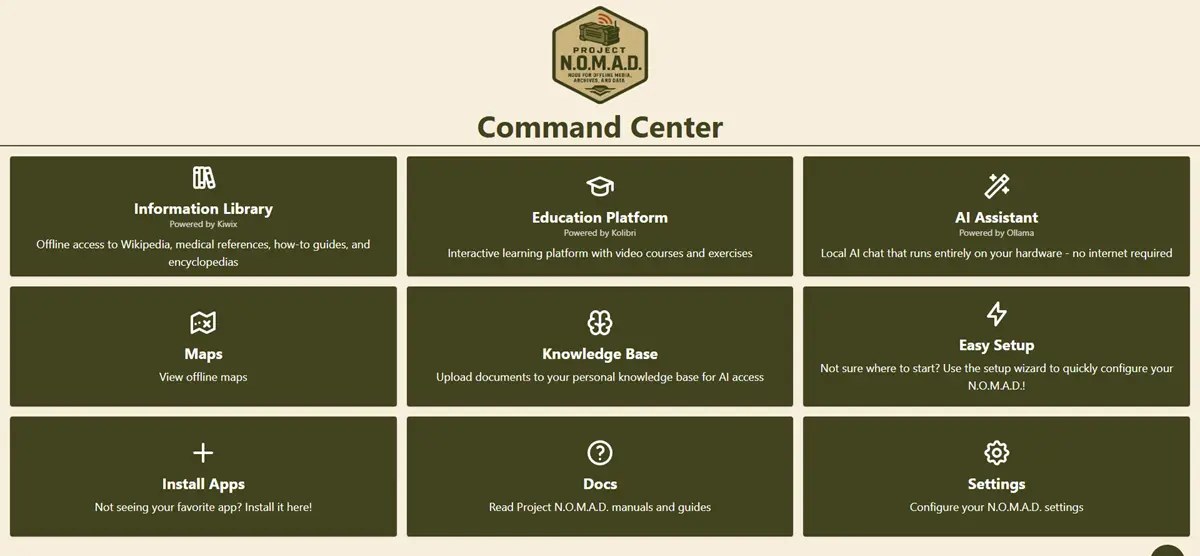
Everything is managed from one web page, the Command Center, which runs each tool as a Docker container.
What I put on mine
The software is the easy part; the content is what makes it useful. I went for a big download:
- Wikipedia with images. Not the text-only edition - articles without their pictures, diagrams and maps lose half their value.
- Dictionaries, so words and translations still work without Google.
- Learning English - lessons to teach the language from the ground up.
- Other teaching material - courses across other school subjects.
- How to build AI - material on how AI and machine learning work, next to the local AI assistant itself.
- Maintaining and repairing things - practical guides for when something breaks and there is no YouTube.
- Offline maps of Europe from Portugal up to the Netherlands and Germany - Portugal, Spain, France, the Netherlands and Germany - so home and the neighbouring countries are covered without a data connection.
All of it sits on the ZFS pool of the server, so the size is not a problem - and snapshots mean one big download is enough.
Guide: installing it in a VM on TrueNAS SCALE
1. Create the VM
In TrueNAS SCALE go to Virtualization and create a VM with Ubuntu Server 24.04 LTS (22.04+ and Debian 12 are supported too). The project's minimum is a dual-core CPU, 4 GB RAM and 10 GB free disk for the base system. The content is what takes space: give the VM a large virtual disk on the ZFS pool, and more cores and RAM if you want the AI assistant (they recommend 32 GB RAM and a GPU for comfortable local AI).
2. Run the installer
Internet is only needed during installation. On the fresh Ubuntu VM:
sudo apt-get update && \
sudo apt-get install -y curl && \
curl -fsSL https://raw.githubusercontent.com/Crosstalk-Solutions/project-nomad/refs/heads/main/install/install_nomad.sh \
  -o install_nomad.sh && \
sudo bash install_nomad.sh
The script installs Docker if it is missing and puts everything in /opt/project-nomad.
3. Open the Command Center
Browse to http://<VM-IP>:8080 and follow the setup wizard. From there you pick which content to download: which Wikipedia edition, which map regions, which courses. Downloads are big, so this is the part that took most of the two days.
4. Day-to-day management
sudo bash /opt/project-nomad/start_nomad.sh
sudo bash /opt/project-nomad/stop_nomad.sh
sudo bash /opt/project-nomad/update_nomad.sh
The update script updates the Command Center itself; the individual apps are updated from the web interface.
Things to know
- There is no login by design. It is meant for a trusted network, so do not expose it to the internet - I only reach it at home or through my StrongSwan VPN.
- It has no built-in telemetry.
- A ZFS snapshot of the VM disk after the big downloads means I never have to download it all again.